On-Page SEO Guide: Building a Page Google Understands and Readers Trust
On-page SEO is everything you fully control within your page, from the title tag to internal links. Each element tells Google and readers what the page is about and why it's worth it.
You can write an excellent article, but if Google doesn't understand its topic, or searchers aren't persuaded to click it, it reaches nobody. On-page SEO is everything you control within the page itself: the title, description, subheadings, content, images and links. Each element is a small message telling the engine and the reader what the page offers.
Key takeaways
- 1Start with search intent: what does the searcher really want from this phrase?
- 2The title and description are your ad in the results; write them for clicks, not stuffing.
- 3One H1, then subheadings that answer the searcher's questions in order.
- 4Link the page to related pages on your site, and describe images with real alt text.
Anatomy of a search-optimised page
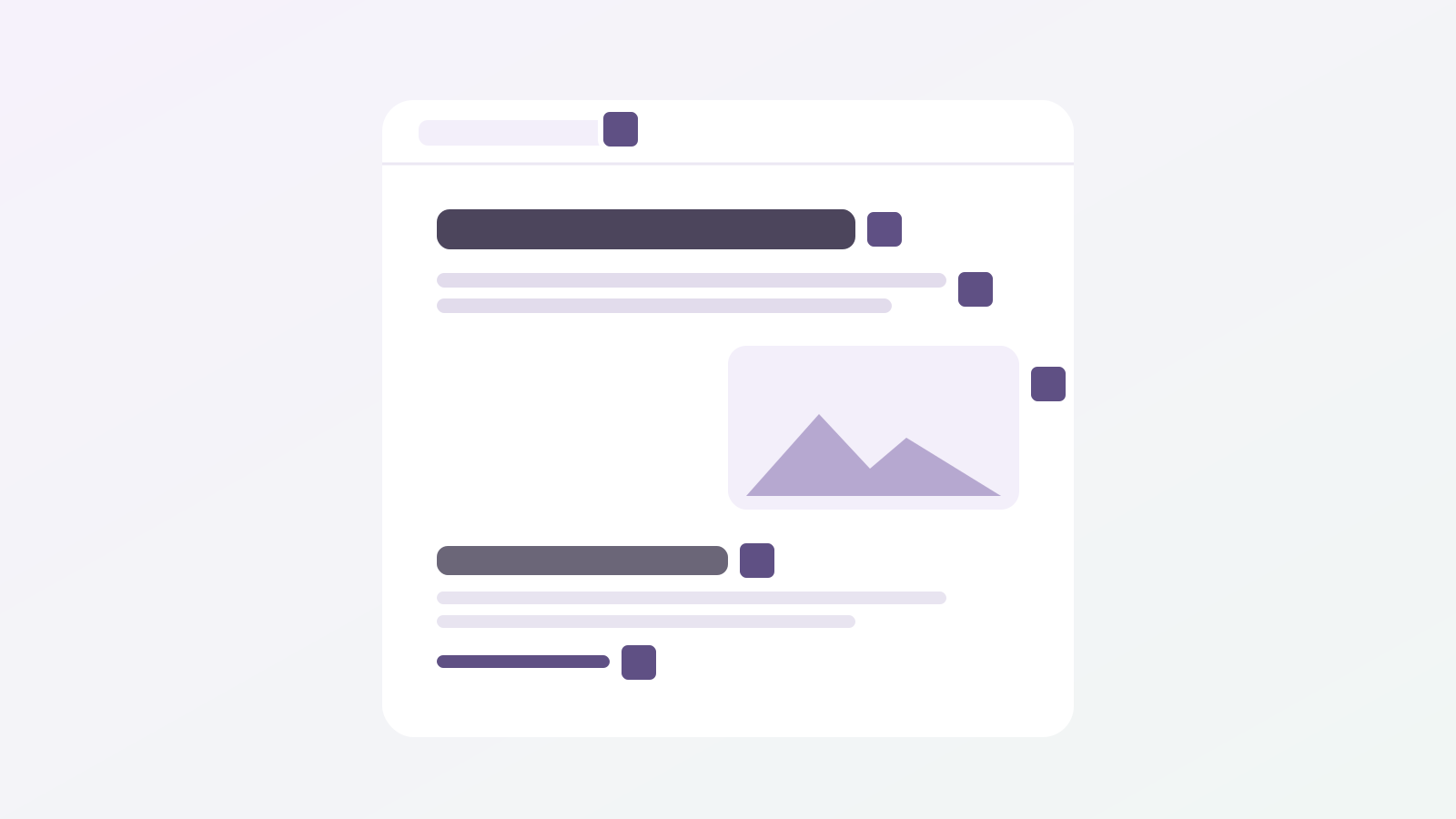
These elements work together. Missing one won't sink a page, but having them all makes its topic clear to the engine and the reader at a glance:
Where does each element live on the page?
- 1Title tag
What appears in the browser tab and the search result, with the key phrase first
- 2H1 heading
The page's main heading, only one, matching the title tag's promise
- 3The intro
Answers the searcher's question quickly and states the topic clearly
- 4Image alt text
Describes the image for the engine and screen readers
- 5H2 subheadings
Split the content into questions people search for
- 6Internal links
Lead to related pages with text that describes them
1. Start with search intent
Before any technical element, ask: what does someone typing this phrase want? Search for it and look at page one; if it's all comprehensive guides, a short service page won't rank, and vice versa. We cover this in our keyword research guide.
An illustrative example: one query, two different intents
Someone searching for "online store design" might want one of two things: a business owner looking for someone to build the store, or a person who wants to learn how to design one themselves. Search the phrase and look at what Google shows. If most results are service pages and agencies, the intent is commercial, and a clear service page fits it. If they're articles and guides, a tutorial fits better. Writing the wrong type of page makes even the best on-page SEO useless, because the page doesn't answer the question the searcher is asking.
2. Title tag and description: your ad in the results
Searchers see your title and description before they see your page. Those two lines decide the click:
A weak title and description
- "Home | Our Company" with no topic
- The keyword repeated three times
- The same description copied on every page
A title and description that earn clicks
- The key phrase at the start of the title
- A clear promise of what the reader will find
- A unique description summarising the benefit with a reason to click
Write them with the SEO Meta Generator and preview how they look in results with the Meta Tags Preview tool.
3. Content structure: headings that answer questions
- 1One H1
Matches the title's promise and states the topic clearly.
- 2An intro that answers fast
The first paragraph confirms the reader is in the right place.
- 3Subheadings phrased as questions
Each H2 answers something people actually search for.
- 4Depth, not length
Cover what readers need to decide, without padding. Check length with the Word Counter.
- 5FAQs at the end
Capture long search phrases and remove the last doubts.
Google's SEO Starter Guide summarises these basics in plain language, including making content easy to read, organising it under clear headings and writing for people before search engines.
The first paragraph decides
Visitors decide within seconds whether to keep reading. Make the first paragraph say clearly what the page covers and who it's for, and answer the main question briefly if you can, then go into detail in the sections that follow. Long introductions that open with the history of the topic or general statements lose readers before they reach what they came for.
4. Images, links and structured data
Descriptive alt text, meaningful file names and light files. Details in our image optimisation guide.
To related pages with descriptive anchor text, as in our internal linking strategy.
Article, Product or BreadcrumbList depending on the page type, as in our schema markup guide.
Internal links are part of the page, not an afterthought
When you write a new page, ask two questions: which existing pages will readers of this page need next, and which older pages should point to this new one? Add links in both directions with anchor text that describes the destination, such as "our hosting selection guide" rather than "click here". It takes minutes, and it helps Google discover the new page and understand how it relates to the rest of the site.
5. Trust is part of on-page SEO
Content that shows real expertise beats generic content. Say who wrote the page and their experience, add examples from your work, update outdated information and cite the sources of figures. These are part of what Google calls E-E-A-T, as we explain in our content quality guide.
Show a last-updated date on articles whose information changes, and cite your sources when you quote a figure or a rule. Readers who can see who wrote a page, when, and where the information came from trust it more, and that's exactly what Google aims to reward.
Common on-page SEO mistakes
Repeating the keyword unnaturally. A sentence that crams the same phrase in three times annoys readers and doesn't help rankings. Write naturally and use synonyms and related phrases.
Similar titles on different pages. When ten pages carry near-identical titles, Google can't tell which one best fits each search. Give every page a unique title that describes its topic precisely.
Images without alt text, or far too large. Alt text describes the image for people who can't see it and for search engines, and oversized files slow the page down. Compress your images and describe each in a short, useful sentence.
Optimising a page once and forgetting it. Search intent and competitors change. The page that was best two years ago may now need a small update to keep its place.
Ignoring the mobile view. Most searches happen on phones. Check every important page on a small screen: headings that wrap awkwardly, buttons that are hard to tap and tables that overflow all undo good on-page SEO work.
Conclusion
On-page SEO makes your page's topic clear and its promise convincing: understood search intent, a title and description that earn clicks, one H1, subheadings that answer questions, described images, internal links and evidence of expertise. It complements technical SEO, which makes sure Google can reach the page at all. If you'd like your key pages optimised, explore our SEO and digital marketing service.
Frequently asked questions
How long should a title tag be?
There's no required length, but Google truncates long titles by width, so put the key phrase first and keep the meaning clear within roughly 50–60 characters.
Should I repeat the keyword a lot?
No. Use it naturally in the title, intro and some subheadings, alongside synonyms. Forced repetition hurts readability and doesn't help rankings.
Is the meta description a ranking factor?
It's not a direct ranking factor, but it affects click-through because it often appears under your title in results.
What's the difference between on-page and off-page SEO?
On-page SEO is what you control inside your page: content, headings, description, images and internal links. Off-page SEO concerns your site's reputation beyond its own pages, such as links from other sites and mentions of your brand. Always start with on-page work, because it's entirely in your hands and makes any off-page effort more effective.
How often should I review my important pages?
Review pages that bring traffic or enquiries every three to six months, or as soon as you notice their visibility dropping. Check that the information is still correct, that the title and description still match what people search for today, and that internal links work.
Sources & references

I believe technology is useful when it solves a clear problem — not when it's adopted because it's trendy. AI is a powerful tool for speeding up research, writing, analysis and automation, but it needs human expertise to review, guide and verify accuracy. That's why I prefer to start by understanding the business and its goals, then choose the simplest solution that delivers a measurable result, and build audience trust with honest, useful content.
- Reader rating
- 5.0(3)
- Published articles
- 82
- #on-page seo
- #content
- #seo
How would you rate this article?
Be the first to rate
Comments
No comments yet. Share your thoughts!